Many family office operations teams manage data across QuickBooks or Sage, Excel workbooks, custodian portals, broker files, private investment PDFs, Addepar or Black Diamond exports, and internal reporting tools. Then a vendor conversation introduces terms like API, SFTP, file import, mapping, connector, and integration layer.
For a nontechnical finance team, that language can make a software evaluation feel more complicated than it needs to be. The practical question behind SFTP family office data and API discussions is simple: how will source data move into the accounting and reporting workflow, and how will the team know it is right?
This guide explains APIs, SFTP, and file imports in plain English. It also shows where each method works, where it breaks, and what to validate before choosing family office software for data aggregation, reconciliation, accounting, and reporting.
Decision summary
| Question | Practical answer |
| What is an API? | A controlled way for two systems to exchange data directly, often on a schedule or when a user triggers a request. |
| What is SFTP? | A secure file-transfer method used to move files from one system to another, often for custodian, broker, bank, or market-data files. |
| What is a file import? | A manual or semi-repeatable process where the team uploads a CSV, Excel file, statement, or other export into the system. |
| Which method is best? | The right method depends on source availability, file quality, frequency, controls, reconciliation needs, and implementation scope. |
| What matters most? | The transfer method matters less than the workflow after intake: mapping, validation, exception handling, reconciliation, accounting, reporting, and export. |
Integration workflows are only useful if reporting stays aligned
FundCount connects APIs, SFTP feeds, and file imports directly to accounting and reporting workflows for cleaner family office operations.
SFTP family office data: what the term means in plain English
SFTP stands for Secure File Transfer Protocol. In family office operations, it usually means a custodian, broker, bank, administrator, or data provider places files in a secure location where the family office system can retrieve them.
The file may contain transactions, positions, cash balances, prices, tax-lot data, FX rates, or other records. The delivery can happen daily, weekly, monthly, or on a custom schedule.
The main benefit is predictability. If the source system can produce a file in a consistent format, SFTP can reduce repeated portal downloads and manual uploads. The main limitation is that the file still has to be mapped, checked, reconciled, and reviewed before it can support reporting.
A secure file arriving on schedule is not the same as report-ready data.
Family office software API integrations: what to validate before relying on them
An API is a way for one system to request or send data to another system through a defined interface. In family office software API integrations, the API might connect to a CRM, data warehouse, portfolio system, custodian, market-data provider, document system, payment workflow, or reporting layer.
APIs are useful when the source system supports the right data fields, the connection is maintained, and the receiving system can interpret the incoming data correctly. They can also reduce repeated file handling when a family office needs regular data movement.
But an API is not a guarantee that the data is complete, correctly classified, or ready for accounting. The operations team still needs to ask practical questions:
- What data fields are available through the API?
- How often does the data refresh?
- What happens if the source changes its format or access rules?
- How are failed requests, missing values, and duplicates flagged?
- Who controls the mapping between source data and entity books?
- Can the team trace report numbers back to source records?
If those questions are not answered, API connectivity can still create reconciliation work downstream.
File imports still matter
File imports are not outdated by default. For many family offices, they remain the right method for low-frequency sources, private investment statements, one-off historical migrations, administrator exports, and unusual asset data.
A file import can be useful when the source does not support an API or SFTP connection, when the data arrives quarterly, or when the team needs to review the file before it affects the books. Excel and CSV imports can also help during implementation, when historical data needs to be validated before go-live.
The risk appears when file imports become the permanent operating model for high-volume, repeatable activity. If the team downloads files from portals, edits them in Excel, uploads them into another tool, and then checks the output manually, the process has likely outgrown the method.
Why family office integrations are harder than a simple data feed
A family office does not only collect balances. It has to connect financial activity to entities, accounts, ownership structures, currencies, books, report packs, and advisor requests.
That is why a data feed that looks simple in a demo can become harder during implementation. A broker file may contain the right transactions but not the right entity mapping. A bank file may show cash movement but not the related intercompany treatment. A private investment statement may arrive as a PDF and require review before it becomes accounting activity. A CRM may hold investor or contact data, but not the accounting logic needed for reports.
The issue is not whether a tool can receive data. The issue is whether the family office can turn that source data into controlled, accounting-backed reporting.
When the current integration workflow starts to break
The current stack may still work when there are few entities, few accounts, and a simple monthly report. It starts to break when the team spends more time moving and checking data than using the reports.
Common signs include:
- The team downloads the same custodian, broker, or bank files every reporting period.
- Excel is used to clean data before it can be imported.
- QuickBooks, Sage, NetSuite, Addepar, Black Diamond, or internal records do not agree without manual adjustments.
- Entity ownership, account mappings, or security mappings live outside the accounting system.
- The team cannot tell whether a reporting error came from the source file, the import, the mapping, or the report formula.
- Private investment data arrives through emails, portals, PDFs, spreadsheets, and administrator statements.
- A technical term like API or SFTP becomes a blocker because the finance team does not know what action is required from IT, the custodian, or the vendor.
- Data has to be exported in a specific format for advisors, tax teams, Power BI, Snowflake, or an owner-facing report.
At that point, the office does not only need a transfer method. It needs a clear operating workflow.
API, SFTP, or file import: how to choose the right method
| Method | Works best when | Limits to check | Questions for the vendor |
| API | The source system supports the needed fields, updates are frequent, and the connection can be monitored. | APIs vary by source, package, permissions, data fields, and refresh timing. | Which fields are available? How are errors logged? How are credentials managed? What happens if the source changes? |
| SFTP | The source can deliver a consistent file on a schedule, such as daily broker files or monthly custodian exports. | A delivered file can still contain missing fields, format changes, duplicates, or unmapped records. | Who sets up the file delivery? What file format is required? How are failed deliveries and changed formats handled? |
| File import | The source is low-volume, irregular, historical, or requires human review before posting. | Manual uploads can become slow and risky when used for repeatable, high-volume workflows. | Can templates be standardized? What validation happens before import? Can rejected records be fixed and reloaded? |
How source data should move from intake to reporting
The method that brings data into the system is only the first step. The larger workflow determines whether the data can support reliable accounting and reporting.
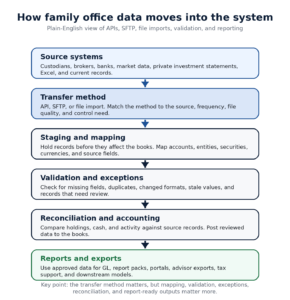
Diagram: How APIs, SFTP, and file imports move through validation, reconciliation, accounting, reporting, and exports.
Diagram: How APIs, SFTP, and file imports move through validation, reconciliation, accounting, reporting, and exports.
- Intake. Data enters through an API, SFTP delivery, or file import.
- Staging. The system holds incoming records before they affect the books or reports.
- Mapping. Accounts, entities, securities, currencies, asset classes, and source fields are matched to the office’s structure.
- Validation. The workflow flags missing fields, duplicates, stale data, changed formats, and records that do not match expected rules.
- Exception handling. The team reviews breaks before the data becomes part of accounting or reporting.
- Reconciliation. Holdings, cash, transactions, and balances are checked against source records and current books.
- Accounting. Approved activity supports the general ledger, investment accounting, entity books, and other accounting workflows.
- Reporting and export. Reviewed data flows into report packs, dashboards, portals, advisor exports, tax support, or downstream models.
This is where many integration projects succeed or fail. A connection can be technically active while the finance team still lacks a trustworthy close process.
What nontechnical operations teams should ask before implementation
The best questions are not deeply technical. They are operational.
Start with source coverage:
- Which custodians, brokers, banks, administrators, market-data providers, CRMs, document systems, and data warehouses are in scope?
- Which sources will use APIs, which will use SFTP, and which will use file imports?
- Who is responsible for obtaining credentials, file specifications, test files, and permissions?
Then define data quality controls:
- What happens when a file is late, incomplete, duplicated, or formatted differently than expected?
- Where do exceptions appear?
- Who reviews and approves corrections?
- Can the team see which records were rejected and why?
- Can approved data be exported in the exact format required by advisors, tax teams, BI tools, or internal models?
Finally, connect integration to reporting:
- Which report numbers must tie back to imported source data?
- Which reports need to match the current report pack?
- Which entity-level and consolidated reports will be tested before go-live?
- What sample period will be used for parallel validation?
Those answers matter more than the label attached to the connection.
How FundCount fits into the integration workflow
FundCount is a fit when the family office needs data movement connected to accounting, reconciliation, and reporting, not only a place to store imported files.
Through family office data aggregation, FundCount helps bring custodian and data-provider information into a controlled workflow that can support accounting and reporting. That matters when the office wants incoming data to become part of a reviewed process rather than another spreadsheet handoff.
FundCount can also serve as the accounting-backed operating layer around the systems a family office still needs. Its family office software brings together portfolio accounting, general ledger, data aggregation, and family office reporting software so data intake connects to books, reports, and outputs.
For integration-heavy offices, AppUniverse integrations are also relevant to evaluate. The practical point is not whether every source uses the same method. The point is whether each source has a defined path into mapping, validation, reconciliation, accounting, reporting, and export.
Bring APIs, feeds, and imports into one source of truth
FundCount helps family offices centralize operational data, ensuring reporting and reconciliation remain consistent across systems.
Implementation: reduce anxiety before the first file moves
Integration anxiety usually comes from unclear ownership. Finance hears API or SFTP and assumes IT owns the project. IT hears accounting and assumes finance owns the project. The custodian, broker, or data provider may also need to supply file specifications, test files, permissions, or credentials.
The way to reduce risk is to define the integration plan before build work begins.
A practical plan should name:
- each source system,
- the transfer method for each source,
- the owner responsible for access and test files,
- required fields,
- mapping rules,
- validation checks,
- exception workflows,
- target reports,
- required exports,
- and the sample period for testing.
FundCount’s implementation process is designed to clarify that scope. It starts with business analysis and a Business Requirements Document covering workflows, required functionality, reporting needs, data sources, and operating structure. From there, implementation can start with one representative entity, validate the setup, and then expand across entities, data links, modules, custom workflows, report packs, and user training.
That sequence is important. It lets the team test the data flow before relying on it across the full family office structure.
Scenario guidance
If your office has simple books, few accounts, and low transaction volume, manual file imports may still be enough. Use clear templates, document who reviews each upload, and avoid turning Excel into the system of record.
If your office has recurring custodian or broker activity, SFTP may be a practical way to reduce repeated portal downloads. Validate file consistency, field coverage, exception handling, and reconciliation before treating the feed as production-ready.
If your office has frequent updates, downstream systems, or a broader technology stack, family office software API integrations may be useful. Validate the available fields, refresh timing, error logs, access rules, and how API data maps to entities, books, and reports.
If your office has many entities, alternatives, multiple custodians, market data, and custom report packs, evaluate the entire operating workflow. The transfer method is only one part of the decision. The larger question is whether the system can connect source data to accounting-backed reporting.
FAQ
Is SFTP the same as an API?
No. SFTP usually moves files from one system to another. An API lets systems exchange data through a defined interface. Both can be useful, but both still require mapping, validation, and reconciliation.
Is an API always better than SFTP?
No. An API can be useful when the source supports the required fields and refresh timing. SFTP may be better when a custodian, broker, or data provider already produces a consistent file that can be delivered on schedule.
Is file import too manual for a family office?
Not always. File imports can work well for historical migration, low-volume sources, private investment statements, and sources that require review before posting. They become risky when they carry repeatable high-volume work every reporting period.
Who should own integration decisions?
Finance, operations, IT, and the vendor should share ownership. Finance defines what the data must mean. Operations defines the workflow. IT supports access, security, and technical setup. The vendor should explain source requirements, testing steps, and exception handling.
What should we bring to an integration demo?
Bring a list of source systems, sample files, current report packs, entity charts, required exports, known reconciliation issues, and any source-specific terms you do not understand. The goal is to validate the workflow, not just hear that a connection is possible.
Conclusion
APIs, SFTP, and file imports are not competing buzzwords. They are different ways to move source data into a family office operating workflow.
For a simple office, a controlled file-import process may be enough. For recurring custodian and broker activity, SFTP can reduce repeated downloads if the files are consistent and validated. For connected systems and frequent updates, APIs may reduce handoffs when the source supports the right fields and controls.
The main decision is not which acronym sounds most modern. The main decision is whether source data can move through mapping, validation, exception handling, reconciliation, accounting, reporting, and export without becoming another spreadsheet-dependent process.