Many family offices run QuickBooks or Sage for the general ledger, Addepar or Black Diamond for portfolio views, custodian portals for holdings, broker files for activity, and Excel for final rollups. The problem begins when those systems stop agreeing with each other, and the team spends more time reconciling than reviewing results. A search for family office reconciliation software usually starts with one practical question: how do we know the report pack is right before it goes to principals, advisors, or tax teams?
The answer is not one more spreadsheet check at the end of the month. Family office reconciliation should be a controlled workflow that validates source data, maps it to the right entities and accounts, flags exceptions, records review decisions, and ties final reports back to accounting activity.
This article explains where reconciliation breaks in the current stack, what an accounting-backed workflow should prove, and how to evaluate software when QuickBooks, Addepar, broker files, Excel, and existing records need to match.
Decision summary
| Question | Practical answer |
| What is the core problem? | The family office has several useful systems, but no single controlled workflow that proves which numbers are final and report-ready. |
| When is the current process enough? | It may be enough when the office has few entities, simple assets, limited data sources, and reports that can be checked quickly. |
| When does it break? | It breaks when QuickBooks, portfolio reporting tools, custodian files, bank records, alternative statements, and Excel workbooks require repeated manual tie-outs. |
| What should reconciliation prove? | It should prove that source data arrived, mappings are correct, exceptions were reviewed, accounting entries tie out, and reports can be traced back to approved records. |
| What should buyers validate? | Validate source coverage, mapping logic, exception handling, approval workflows, export formats, report replication, and implementation scope. |
Stop reconciling reports across spreadsheets and systems
FundCount centralizes accounting and reporting so family office teams can reduce manual tie-outs and reporting risk.
What family office reconciliation software should actually prove
Good reconciliation does not only tell the team that the two totals match. It shows why they match, where they do not match, who reviewed the difference, and whether the final report is ready to use.
This is the practical standard: the system should help the team connect source data to accounting, entity activity, and reports without hiding the review process.
A family office should be able to answer these questions before a report leaves the office:
- Did all expected custodian, broker, bank, and alternative investment data arrive for the period?
- Was each source mapped to the right entity, account, security, asset class, currency, and owner view?
- Do cash, holdings, transactions, income, expenses, valuations, and capital activity tie out across systems?
- Which breaks remain open, and who owns them?
- Which corrections were made, and why?
- Can the final report number be traced back to the source data and accounting activity?
If those answers live in email threads, workbook notes, and one person’s memory, the reconciliation process is still fragile even when the final report looks polished.
Why the current stack starts to break
QuickBooks, Sage, NetSuite, Addepar, Black Diamond, Excel, bank portals, broker portals, and data warehouses can each play a useful role. The issue is the handoff between them.
A general ledger may hold entity books. A portfolio system may show positions and performance. A custodian file may contain transactions and holdings. A bank portal may show cash. A private investment PDF may carry a revised NAV or capital call. Excel may hold the final report format. None of those sources is wrong by itself, but the family office still needs a controlled way to decide which records are final.
Reconciliation becomes harder when:
- QuickBooks or Sage does not match portfolio reporting without manual adjustments.
- Addepar, Black Diamond, or another portfolio reporting tool shows values that do not tie to the books.
- Broker and custodian files use different formats, timing, identifiers, or cash classifications.
- Alternative investment data arrives as PDFs, emails, portal downloads, and manager spreadsheets.
- Entity ownership, family member views, or intercompany activity live outside the accounting system.
- Reports require several Excel rollups before review.
- Only one or two people know how the reconciliation workbook works.
- Downstream advisors, tax teams, or BI tools require exports in exact formats.
At that point, the team is not struggling because it lacks effort. The process has outgrown the stack.
The reconciliation workflow: from source data to reviewed reports
Reconciliation should happen before the report pack is assembled, not after the numbers have already been copied into presentation files. A stronger workflow moves through source validation, normalization, matching, exception handling, approval, and reporting.
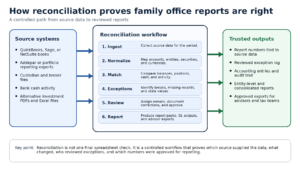
Diagram: A controlled workflow for reconciling family office source data before reports are distributed.
The important point is sequence. If source data is incomplete, mappings are inconsistent, or exceptions are undocumented, the final report may look right while still being difficult to defend.
Investment data reconciliation for family office reporting: what to check
The phrase investment data reconciliation family office may sound technical, but the work is practical. The team needs to check each source against the role it plays in reporting, accounting, and decision-making.
| Source | Reconciliation checks |
| Custodian and broker files | Confirm holdings, transactions, cash, income, fees, security identifiers, and period-end balances. Watch for timing differences, duplicate records, corporate actions, and missing identifiers. |
| Bank and cash data | Tie deposits, withdrawals, credit cards, loans, operating cash, and intercompany activity to the right entity and account. Watch for cash activity that never reaches the investment reporting workflow. |
| General ledger | Confirm journal entries, expenses, income, realized and unrealized activity, entity books, and multi-currency treatment. Watch for investment activity that sits outside the GL. |
| Portfolio reporting tools | Compare positions, performance, valuations, and owner-facing views against accounting records. Watch for a dashboard view that does not tie back to entity books. |
| Alternative investment data | Review capital calls, distributions, commitments, NAVs, valuations, side pockets, and manager statements. Watch for late files, revised values, and PDF data that requires review. |
| Excel, BI, and downstream exports | Confirm final report packs, dashboards, tax exports, advisor files, and owner summaries use approved data. Watch for hidden formulas, stale mappings, and manual overrides. |
Source validation comes before matching
Many reconciliation problems begin before the team compares numbers. If the wrong file arrives, a period is missing, or a revised statement replaces an earlier version, the matching step can produce false confidence.
Source validation should confirm:
- which files, feeds, statements, or exports were expected for the period;
- which ones arrived, failed, or arrived late;
- whether the file covers the right entity, account, portfolio, date range, and currency;
- whether the source was revised after the original import;
- and whether the data contains missing fields, duplicate records, or format changes.
This step matters because a reconciliation system cannot prove the report is right if it cannot first prove what source data it used.
Normalization prevents false breaks
Even when the source data is complete, different systems describe the same activity in different ways. One system may use a ticker, another a CUSIP or ISIN. One file may classify activity as income, another as cash movement. One report may use manager names, another uses fund names.
Normalization maps those differences before the team starts matching records. For a family office, that usually means mapping securities, entities, accounts, custodians, currencies, transaction types, asset classes, managers, family members, and reporting views.
Without this layer, the team gets avoidable breaks. The data appears wrong because the systems do not speak the same language.
Exception handling should be visible, assigned, and reviewable
Not every exception means the data is wrong. Some breaks come from timing differences, trade date versus settlement date, stale prices, revised private fund statements, corporate actions, fee reclassifications, FX rates, or activity that belongs in a different entity.
The problem is not the existence of exceptions. The problem is when exceptions are resolved in private spreadsheets without a clear owner, status, reason, or approval trail.
A controlled workflow should show:
- the source of the break;
- the accounts, entities, securities, or transactions affected;
- the dollar amount or position difference;
- the person responsible for review;
- the correction or explanation;
- the approval status;
- and whether the exception affects final reporting.
This is where reconciliation creates trust. It gives the team a way to explain differences instead of hiding them in the final workbook.
Auditability means the report can be traced back to source data
Auditability does not mean every report is prepared for a formal audit. It means the team can defend how the number was produced.
For each material report number, the office should be able to trace the path from source file or feed, to mapping, to accounting entry or valuation record, to review decision, to final output. That trail is hard to maintain when data is copied across portals, spreadsheets, BI tools, and report packs.
The audit trail should also show change history. If a price was overridden, a cash balance was adjusted, a private investment NAV was revised, or an entity mapping changed, the team should know what changed, when it changed, and why.
How FundCount fits the reconciliation workflow
FundCount is a fit when the office needs reconciliation connected to accounting, investment activity, and reporting, rather than a separate spreadsheet process. It can serve as an accounting-backed operating layer between source data and final reports.
FundCount connects family office data aggregation, portfolio accounting, partnership accounting, general ledger, and family office reporting software so teams can reduce the number of manual handoffs between source data, accounting records, and report packs.
That does not mean every existing tool disappears. A family office may still rely on custodians, brokers, banks, market data providers, document tools, CRM systems, tax tools, and BI platforms. The key decision is which system owns the accounting truth and how approved data moves to the rest of the stack.
For offices comparing FundCount with current systems, the right test is specific: bring the current report pack, entity chart, source files, reconciliation workbooks, and required exports. Then, validate how source data is ingested, mapped, reconciled, reviewed, reported, and exported.
One source of truth for reconciled family office reporting
Keep books, balances, valuations, and reports aligned across entities, accounts, and investments.
Implementation: validate reconciliation before full migration
Reconciliation projects should not start with every entity, every feed, and every historical report at once. The safer path is to define what needs to tie out, test the workflow on a representative structure, and expand after the team understands the breaks.
FundCount’s implementation process includes business analysis and a Business Requirements Document that identifies workflow, functionality, reporting requirements, data sources, and capability gaps. The implementation path can start with one entity, then expand to all entities, custodian and bank data links, modules, custom workflows, custom reports, and training.
For reconciliation, that phased approach should focus on proof: can the model entity tie to source data, accounting activity, and the report pack? Can open exceptions be reviewed and explained? Can the output match the format the office needs?
Scenario guidance
If your office has a small number of entities, limited alternatives, and a simple report pack, the current reconciliation process may still be workable. Keep Excel focused on analysis and review, not as the hidden system of record.
If your office uses QuickBooks plus Addepar or another portfolio reporting platform, the key question is which system owns accounting truth. If the two systems require repeated manual tie-outs before reports can go out, evaluate a workflow that connects investment activity to the books.
If your office has several custodians, brokers, banks, private investments, and report packs by entity or family member, evaluate purpose-built family office software around data aggregation, reconciliation, exception handling, reporting, exports, and implementation scope.
If your office relies on BI tools, data warehouses, or advisor models, keep those tools where they add value. The reporting layer should receive approved data, not become the place where accounting logic and manual corrections are buried.
FAQ
What does reconciliation software do for a family office?
The software helps teams compare source data, accounting records, portfolio activity, cash, valuations, and reports so they can identify breaks before reports are distributed.
Why do QuickBooks and Addepar numbers often need reconciliation?
They may serve different roles. QuickBooks may hold bookkeeping and entity activity, while Addepar or another portfolio platform may hold investment views. The family office still needs to decide how investment activity, entity books, and final reports tie together.
Can Excel still be used in reconciliation?
Yes. Excel can support ad hoc analysis and review. It becomes risky when it stores core mappings, exceptions, approvals, and final report logic outside a controlled workflow.
What is an exception in family office reconciliation?
An exception is a difference or missing item that requires review. Examples include unmatched transactions, stale prices, missing FX rates, duplicate records, timing differences, unmapped securities, and revised private investment values.
What should we bring to a reconciliation software demo?
Bring your report pack, entity chart, chart of accounts, custodian and broker files, bank sources, portfolio reporting exports, alternative investment statement samples, and the spreadsheets used to resolve breaks today.
Conclusion
Family office reconciliation is not a final formatting step before a report goes out. It is the workflow that proves source data arrived, mappings are correct, exceptions were reviewed, accounting records tie out, and report numbers can be traced back to approved records.
For simple offices, a controlled spreadsheet process may still be enough. For offices with multiple entities, several custodians and brokers, alternative investments, portfolio reporting tools, and exact report-pack requirements, reconciliation should move into an accounting-backed workflow.