A family office can run for years on QuickBooks, Excel, custodian portals, broker files, and portfolio reporting tools. The problem begins when those systems stop agreeing and the team spends more time reconciling, checking, and rebuilding reports than reviewing the family’s financial position.
That is why family office software implementation has to be more than a software setup project. It has to validate the office’s real operating model: entities, data sources, investments, accounting workflows, reports, approvals, exports, and user responsibilities.
This article explains what to expect before go-live, how to reduce migration risk, and how to evaluate the path to implement family office accounting software without turning implementation into another manual project.
Decision summary
| Question | Practical answer |
| What is the main implementation risk? | Going live before the office has validated entity setup, source data, accounting logic, reports, users, and exception workflows. |
| What should happen first? | Discovery should document the current stack, entity chart, report pack, data sources, integrations, pain points, and success criteria. |
| Why use a model entity? | A model entity lets the team test real accounting and reporting logic before scaling the setup across all entities. |
| What should be validated before going live? | Migrated data, custodian and bank links, chart of accounts, reports, permissions, user workflows, support process, and cutover plan. |
| Where does FundCount fit? | FundCount should be evaluated when the office needs investment accounting, general ledger activity, data aggregation, and reporting connected in one accounting-backed workflow. |
A successful implementation starts with a strong system of record
FundCount helps family offices unify accounting, reporting, and consolidation workflows before complexity scales further.
Why implementation anxiety is rational
Family offices are right to be cautious. A new platform can affect month-end reporting, family-facing statements, partnership activity, tax support, cash visibility, investment accounting, and access controls. If the scope is vague, the implementation can feel risky before it starts.
The fear is not only about switching software. The real concern is losing control of the numbers during the switch. A team that already depends on Excel workbooks, QuickBooks exports, Addepar downloads, private investment PDFs, and broker files needs confidence that the new workflow will match the office’s actual reporting obligations.
A good implementation process turns that anxiety into a sequence of validation steps. The goal is not to promise that implementation is effortless. The goal is to make the work visible, scoped, and testable before go-live.
When the current setup starts to break
Implementation usually becomes urgent after the current stack has already reached its limits. The tools may still be useful, but the handoffs between them create risk.
- Reports require several spreadsheet rollups before review.
- QuickBooks, Sage, NetSuite, Addepar, Black Diamond, or Excel do not reconcile without manual adjustments.
- Entity ownership, related-party activity, capital accounts, or family member views live outside the accounting system.
- Alternative investment data arrives as PDFs, emails, portals, statements, and spreadsheets.
- A report pack takes days to assemble and still needs manual checking.
- Only one or two people understand how the current reporting workbook works.
- Data must be exported in a specific format for tax, advisors, BI tools, or downstream models.
- The team cannot trace every number in the family report back to accounting activity or source data.
Those are not signs that the team is careless. They are signs that the operating model has outgrown the stack.
What family office software implementation should clarify before going live
A practical implementation starts by answering a simple question: what must be true before the office can trust the new system for a real reporting cycle?
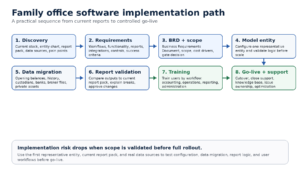
Diagram: A practical family office software implementation path from discovery to going live.
The path should move from discovery to requirements, then into a scoped implementation plan. From there, the team should validate one representative entity, expand the configuration, migrate and connect data, test reports, train users, and plan the cutover.
This sequence matters because each stage protects the next. If the entity setup is wrong, report validation will fail. If source data is not mapped, reconciliation will slow down. If users are trained only on screens instead of workflows, the team may still depend on manual workarounds after go-live.
Step 1: Discovery should start with the current operating reality
Discovery should not begin with a feature checklist. It should begin with the way the office works today. That means documenting the current chart of accounts, entity chart, investments, custodians, brokers, banks, private investment sources, accounting systems, reporting tools, spreadsheets, exports, and review steps.
The most useful discovery sessions ask for artifacts, not opinions. Bring the current report pack, entity chart, sample custodian files, bank statements, private fund statements, trial balances, chart of accounts, custom Excel workbooks, and any required exports. These documents show what the new system must support.
This is also where the office should define success. For example: close 10 entities without manual consolidation, reproduce the family report pack, import 3 custodian feeds, produce entity-level and consolidated reports, or reduce manual adjustments in the quarterly report cycle.
Step 2: Requirements should separate must-haves from preferences
Requirements should explain what the system must do for the office to operate. Preferences describe how users would like the system to behave. Both matter, but they should not carry the same weight.
| Requirement area | Questions to answer before go-live |
| Entities and ownership | Which entities, trusts, LLCs, partnerships, individuals, foundations, and family branches must be tracked separately and together? |
| Accounting setup | What chart of accounts, books, currencies, accounting basis, intercompany activity, and opening balances must be configured? |
| Investments and data sources | Which custodians, brokers, banks, market data providers, private investment managers, and spreadsheets feed the workflow? |
| Reports and exports | Which report packs must be replicated, what formats are required, and who approves the output? |
| Controls and access | Which users need access, what permissions apply, and what review or approval steps protect the reporting process? |
| Implementation scope | Which items belong in phase 1, which can wait, and what would prevent go-live? |
This separation keeps the project from expanding without control. It also helps the family office decide what must be ready for the first live reporting cycle and what can move into a later phase.
Step 3: The Business Requirements Document should make scope visible
The Business Requirements Document, or BRD, is where implementation becomes concrete. It should capture workflows, functionality, reporting requirements, data sources, model entities, capability gaps, and the planned solution for each gap.
A useful BRD gives the office and vendor a shared reference point. It should reduce confusion about what is included, which data sources will be connected, which reports will be built, which modules will be activated, and what the go-live definition means.
FundCount’s implementation approach includes a business analysis phase that produces a BRD covering workflow, functionality, and reporting requirements. FundCount also describes a gate decision before deployment, so the office can review implementation estimates before committing to the full software rollout.
Step 4: Start with a model entity before expanding
A model entity is a representative entity used to test the setup before the full rollout. It should be complex enough to expose real workflow issues, but narrow enough that the team can validate it carefully.
The model entity should test the core accounting logic: chart of accounts, opening balances, investments, cash, data imports, ownership views, reporting outputs, and user review steps. If the office has trusts, LLCs, partnerships, private investments, or multi-currency activity, the model entity should include enough of that complexity to reveal gaps.
This stage prevents the team from discovering fundamental issues after every entity has already been configured. It also gives users a practical way to understand the future workflow before the project scales.
Step 5: Data migration should be planned by use case
Data migration is not one task. Opening balances, historical transactions, security masters, private investment positions, bank activity, entity records, ownership structures, and reporting history each have different uses. The office should decide what data needs to move, why it needs to move, and how far back it should go.
Not every historical record has to be migrated in the same way. Some offices need full transaction history for performance and tax support. Others may need opening balances, active positions, and selected history for reporting continuity. The right answer depends on the reporting requirements, audit needs, tax workflows, and the level of historical detail users expect in the new system.
The migration plan should also define how source data will be validated. A family office should know who compares migrated data against current records, who approves corrections, and how exceptions are documented.
Step 6: Data links and integrations need operational owners
Integrations should not be treated as a technical side project. Custodian feeds, broker files, bank links, market data, CRM connections, BI exports, and document workflows all affect the office’s ability to close and report.
For each source, the team should know how data arrives, how often it arrives, what fields are required, who owns failures, and what happens when a file is late or incomplete. If the office uses APIs, SFTP, file imports, or manual uploads, the implementation plan should explain the operational difference in plain language.
FundCount’s family office platform includes data aggregation and can support source-data workflows alongside portfolio accounting, partnership accounting, general ledger, and family office reporting software. That combination matters when the office wants data feeds to support accounting-backed reporting rather than separate dashboard views.
Reduce implementation risk by simplifying the back office
FundCount helps family offices replace fragmented tools and spreadsheet-heavy processes with one unified platform.
Step 7: Report validation is the real go-live test
Report validation is where the implementation becomes real. The office should compare the new reports against the current report pack and explain meaningful differences.
The goal is not to recreate every spreadsheet formula blindly. The goal is to understand which numbers should match, which calculations should change because the system is handling them differently, and which report formats must remain identical for stakeholders.
Validation should include entity-level reports, consolidated reports, investment reports, capital statements, balance sheets, cash reports, performance views, and any exports sent to tax, advisors, or downstream models. The team should also confirm how exceptions appear and who approves final output before distribution.
Step 8: Training should follow workflows, not only screens
Training is most useful when it maps to the work users actually perform. Accounting users need to know how activity reaches the books. Operations users need to know how data imports and exceptions are handled. Reporting users need to know how report packs are produced, reviewed, approved, and delivered.
FundCount’s implementation page describes training through FundCount Academy, access to the Knowledge Base, and a transition to support after implementation. Those resources matter because go-live is not the end of adoption. The team still needs to build confidence in the daily, monthly, and quarterly workflows.
Training should answer practical questions: Who imports data? Who reviews breaks? Who posts entries? Who approves reports? Who handles a failed feed? Who changes mappings? Who can export data?
Step 9: Go-live should be a controlled cutover, not a calendar date
A go-live date is useful, but readiness matters more than the date itself. The office should go live when the core workflow has been tested with real inputs, and the team understands how to operate the system.
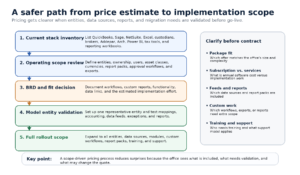
Diagram: Five areas to validate before a family office software goes live.
A practical go-live decision checks five areas: data sources, accounting setup, report validation, user readiness, and support plan. If one area is not ready, the team should decide whether the issue blocks go-live or can be managed after cutover.
Some offices should run parallel reporting for at least one cycle. That gives the team time to compare outputs, explain differences, and build confidence before the new workflow becomes the source used for family-facing reports.
How to implement family office accounting software without increasing risk
The safest way to implement family office accounting software is to validate the operating model in layers. Start with real documents and real reports. Convert them into requirements. Build the model entity. Test source data and migrated data. Validate reports. Train users. Then move to go-live.
This approach works because it turns implementation into a series of decisions the office can understand. It also keeps the team from assuming that a system is ready because configuration is complete. Configuration only matters if the office can close, review, explain, and report from it.
FundCount is a fit when the office needs an accounting-backed operating layer for investment accounting, entity accounting, partnership activity, data aggregation, report production, and review workflows. It should be evaluated against the current stack using the office’s own entity chart, report pack, data sources, and required exports.
Scenario guidance
If your office has a small number of entities, simple assets, and limited reporting requirements, implementation may focus on clean setup, opening balances, basic reports, and user training. The current stack may still work if it produces accurate reports without heavy manual reconciliation.
If your office has multiple entities, several custodians, private investments, and recurring report packs, implementation should include model-entity validation, source-data testing, reconciliation workflows, and report replication before go-live.
If your office has complex partnerships, capital accounts, waterfalls, multi-currency books, or custom stakeholder reports, implementation should be scoped around accounting logic and report validation first. Data migration and integrations should support that workflow, not define it.
If your office is a multi-family office or fund administrator, implementation should also address scalability: client-specific reports, permissions, repeatable onboarding, support ownership, and a process for adding new entities or data sources after launch.
FAQ
How long does family office software implementation take?
Implementation length depends on entity complexity, data sources, historical migration, integrations, report customization, user training, and internal review. The better question is what must be validated before go-live.
What should we prepare before implementation starts?
Prepare your entity chart, current report pack, chart of accounts, trial balances, custodians and brokers list, bank sources, private investment samples, required exports, user list, permission requirements, and examples of manual reconciliations.
Do we need to migrate all historical data?
Not always. Some offices need detailed transaction history. Others can start with opening balances, active positions, and selected reporting history. The decision should follow reporting, tax, audit, and operational requirements.
Why start with one model entity?
A model entity lets the office validate accounting logic, source data, report outputs, and user workflows before expanding the setup across the full structure.
What makes report validation difficult?
Report validation is difficult when current reports depend on hidden Excel formulas, manual adjustments, inconsistent data sources, or definitions that were never formally documented. The implementation should make those assumptions visible.
Can we keep tools like QuickBooks, Addepar, Arch, Salesforce, or Power BI?
Some tools may remain in the stack if they serve a clear role. The implementation should define which system owns accounting truth and which systems receive reviewed data, documents, CRM activity, analytics, or exports.
Conclusion
Family office software implementation should reduce uncertainty, not create more of it. The right process starts with the current operating reality, documents requirements, validates a model entity, migrates the right data, tests reports, trains users, and goes live only when the team can operate the workflow with confidence.
For a simple office, that may mean a focused setup and clear training plan. For a growing multi-entity family office, it usually means validating data sources, accounting logic, and reporting outputs before rollout. For complex structures, the key is to test the real reporting package and entity structure before assuming scope.
Bring your current reporting package, entity chart, and data-source inventory to a workflow review. That is the fastest way to see what implementation must prove before going live.