Many family offices run QuickBooks or Sage for accounting, Excel for consolidation, Power BI for dashboards, Salesforce for relationship records, Snowflake for data storage, and custodian portals for source files. The stack may look advanced, but it starts to break when each tool holds a different version of the same number.
That is the core issue behind family office Power BI reporting, CRM integration, and warehouse strategy decisions. The question is not whether these tools are useful. The question is where each tool should sit so that accounting, reporting, CRM, and analytics do not become competing sources of truth.
This article explains what each system should own, where FundCount fits, and how to design a stack where Power BI, Salesforce, and Snowflake connect around an accounting-backed core instead of replacing it.
Decision summary
| Question | Practical answer |
| Should Power BI own the numbers? | No. Power BI is strongest as a visualization and dashboard layer. It should consume reviewed accounting and investment data, not become the hidden place where accounting logic is rebuilt. |
| Should Salesforce own family office financial data? | Salesforce is best for relationships, service workflows, contacts, advisors, and client context. It can receive approved summaries, but it should not own books, transactions, capital accounts, or reconciliations. |
| Should Snowflake become the accounting source of truth? | A warehouse for a family office can store approved data for analytics, history, and cross-system reporting. It should not become the place where month-end accounting adjustments live without review controls. |
| Where should FundCount sit? | FundCount is a fit as the accounting-backed operating layer for data aggregation, portfolio accounting, partnership accounting, general ledger activity, reconciliation, reporting, and exports. |
| What is the main design rule? | Put accounting truth in the accounting system. Let BI, CRM, data warehouse, and spreadsheet tools consume governed data from that core. |
Dashboards are only as good as the data underneath
FundCount gives family offices an accounting-first system of record that connects cleanly to BI, CRM, and data warehouse tools.
Why “where data lives” matters
The phrase “single source of truth” can sound abstract until the monthly report pack does not match the dashboard. A CIO may trust the Power BI view, a controller may trust the general ledger, an operations lead may trust the custodian export, and an advisor may trust a spreadsheet. All of them may be looking at reasonable data, but not the same controlled data.
For a family office, the risk is not only that one report is wrong. The risk is that no one can explain which system owns the final answer. That creates delays, duplicate review, and awkward questions when a principal asks why two reports show different values.
The cleaner model separates data ownership from data access. Power BI, Salesforce, Snowflake, Excel, and advisor systems may all need access to data. They should not all own the rules that create accounting balances, investment values, entity views, capital accounts, or consolidated reports.
When family office Power BI reporting starts to break
Power BI can be useful for dashboards, KPIs, and stakeholder views. Microsoft describes Power BI as a platform for self-service and enterprise business intelligence that connects to and visualizes data. That role fits many family office reporting needs.
The problem begins when the dashboard becomes the place where the team fixes accounting gaps. A dashboard should not be the first place where securities are mapped, entities are combined, FX rates are adjusted, or private investment values are corrected.
Warning signs include:
- Power BI pulls directly from QuickBooks, broker files, custodian exports, Addepar downloads, and Excel workbooks without a reviewed accounting layer in between.
- DAX measures or Power Query steps contain accounting logic that only one analyst understands.
- The dashboard shows updated balances before accounting has reconciled the period.
- The CFO report and the Power BI dashboard disagree, and both require separate explanations.
- Entity ownership, family member views, and intercompany activity are handled inside the dashboard model.
- Private investments, capital calls, distributions, and NAV updates still depend on manual spreadsheet adjustments before they appear in charts.
- The office cannot trace a dashboard number back to source activity, accounting entries, and report approval.
Power BI should make reviewed data easier to see. It should not become the system where the family office quietly rebuilds accounting.
Salesforce family office integration: what CRM should own
Salesforce can be valuable when a family office needs a central place for relationships, contacts, tasks, service workflows, advisor interactions, and family member context. Salesforce describes CRM integration as connecting third-party applications to the CRM so data and workflows can be synced between them.
For family offices, Salesforce family office integration should answer a specific question: what CRM context needs to connect with accounting and reporting data?
Good CRM-owned data may include:
- family members, advisors, outside managers, contacts, and service providers,
- communication preferences and relationship ownership,
- onboarding, service requests, tasks, and workflow status,
- document or request tracking where CRM is the operating tool,
- and approved report or account summaries that help relationship managers answer questions.
The CRM should not own the chart of accounts, investment transactions, NAV calculations, partnership allocations, realized and unrealized gains, or entity-level books. If those records live in Salesforce because no accounting-backed source is trusted, the integration problem has become a governance problem.
A better CRM connection gives relationship teams approved financial context without changing who owns the books. The relationship team can see the information it needs, but the accounting team still owns the records that must reconcile.
Where a family office data warehouse fits
Snowflake and other warehouse tools can be useful when a family office needs historical analysis, cross-system data models, custom analytics, or controlled data delivery to other systems. Snowflake documentation describes the platform as a data cloud environment for working with data, apps, and data sharing.
This warehouse is strongest when it stores approved data from systems of record. That can include accounting outputs, CRM records, document metadata, market data, portfolio summaries, and reporting history. The warehouse can support analytics that are difficult to run inside operational systems.
The problem starts when the warehouse becomes the place where finance logic is edited after the books. If accounting adjustments, entity mappings, ownership percentages, or valuation corrections live only in warehouse tables, the office may create fast analytics with weak controls.
Your warehouse strategy should answer questions like:
- Which approved data sets need to be stored for long-term analysis?
- Which systems feed the warehouse, and which system owns each field?
- What is the refresh schedule?
- Which reports are informational, and which are accounting records?
- Who can change mapped data after it leaves the system of record?
- Can the office trace the warehouse output back to reviewed accounting and source data?
The warehouse can be valuable. It should not become a second accounting system.
What each system should own
The right answer is rarely “replace everything.” Most family offices should keep useful tools, but define what each one owns.
| System | Best role | Should not own |
| FundCount | Accounting-backed operating layer for family office software, data aggregation, portfolio accounting, partnership activity, the general ledger, reconciliation, and report production. | CRM relationship history, broad enterprise warehousing, or every ad hoc dashboard a business user may want. |
| Power BI | Dashboards, visual analysis, KPIs, management views, and role-specific reporting from reviewed data. | Accounting entries, reconciliations, ownership rules, or manual fixes that should be controlled before reporting. |
| Salesforce | Contacts, households, advisors, service workflows, relationship activity, and CRM-driven tasks. | Books, transactions, capital accounts, NAV calculations, realized gains, or family office accounting rules. |
| Snowflake | Data storage for approved data sets, long-term history, cross-system analysis, and data delivery to analytics teams. | Unreviewed accounting adjustments, spreadsheet-like correction tables, or undocumented mapping logic. |
| Excel | Ad hoc analysis, review support, scenario work, and presentation drafts. | Transaction history, entity ownership, report formulas, approval logic, and final accounting adjustments. |
| Custodians, brokers, banks, and managers | Source statements, transactions, positions, cash activity, valuations, and supporting documents. | Consolidated entity reporting, accounting decisions, or family-specific report packs. |
Recommended data ownership model
A cleaner operating model puts FundCount at the accounting core, then connects Power BI, Salesforce, Snowflake, and other downstream tools around that core.
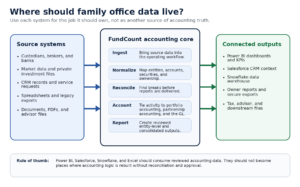
Diagram: Data ownership model for a family office
In this model, source systems feed the accounting workflow. FundCount supports ingestion, normalization, reconciliation, accounting, and reporting. Downstream systems receive reviewed data for the jobs they do best: Power BI for dashboards, Salesforce for CRM context, Snowflake for warehouse analysis, and exports for advisors, tax teams, and owners.
The point is not to restrict data access. The point is to stop each system from creating its own financial truth.
How FundCount fits with Power BI, Salesforce, and Snowflake
FundCount should be evaluated when the office needs an accounting-backed core that can connect investment activity, entity accounting, data aggregation, reconciliation, reporting, and exports.
Its family office software positioning includes portfolio accounting, partnership accounting, general ledger, reporting, investor portal, data aggregation, and AppUniverse. For a multi-system stack, that matters because the office needs one place where source activity becomes accounting-backed reporting before it moves downstream.
For family office reporting software, FundCount supports standard reports, adaptable templates, Excel template integration for bespoke analysis, interactive reports, and secure sharing through the FundCount Investor Portal. That makes it a better fit for report production and review than forcing all final logic into a dashboard layer.
For integrations, AppUniverse integrations are relevant when the office needs CRM, payment, workflow, document, or other applications to connect into the broader operating stack. If your evaluation includes Salesforce, Power BI, Snowflake, or other connected tools, the right next step is to validate the specific data flow: source, owner, refresh frequency, export format, review step, and downstream user.
Power BI and Snowflake still need a source of truth
FundCount keeps accounting, portfolio data, and reporting aligned so downstream dashboards stay consistent and explainable.
How to evaluate the stack before changing systems
Do not start by asking, “Can these tools integrate?” Start by asking, “Which system owns each decision?”
A useful evaluation process looks like this:
- List every system that stores financial data. Include accounting systems, broker portals, custodian feeds, Addepar or other reporting platforms, Power BI, Salesforce, Snowflake, Excel, data rooms, and manual uploads.
- Name the system of record for each data type. Define ownership for entities, accounts, securities, transactions, positions, valuations, FX rates, capital accounts, CRM contacts, report packs, and exports.
- Find where accounting logic is hidden. Look for Power Query steps, DAX measures, spreadsheet formulas, warehouse preparation steps, manual mapping tables, and CRM fields that change financial outputs.
- Separate reviewed data from analysis data. Power BI and Snowflake can analyze data, but the reviewed accounting result should come from a controlled process.
- Validate report replication. The office should test whether current report packs can be recreated from approved source data, not copied from old spreadsheets.
- Confirm export and integration requirements. Define whether each handoff uses API, SFTP, file import, scheduled export, manual review, or a warehouse feed.
- Run a model entity first. Use one entity or structure to test mappings, reconciliations, reporting, exports, and dashboard output before expanding the workflow.
FundCount’s implementation process is relevant here because implementation should start with requirements, data sources, workflow, reports, and scope. For a multi-system stack, the most important question is not whether data can move. It is whether the data still has a clear owner after it moves.
Scenario guidance
If Power BI is already producing helpful visuals from reviewed accounting data, keep it in that role. Improve the feed, governance, and refresh process rather than rebuilding finance logic inside the dashboard model.
If Salesforce is the relationship system, keep it focused on CRM. Connect approved financial summaries only when relationship teams need them, and make sure the accounting system remains the owner of financial records.
If Snowflake is used as a data warehouse for a family office, use it for storage, history, cross-system analytics, and downstream analysis. Do not let warehouse tables become the place where accounting adjustments are made after review.
If Excel is still the place where transaction data, entity ownership, mapping logic, and report formulas come together, the stack has outgrown its control model. Evaluate a purpose-built operating layer before adding more dashboards or warehouse tables.
If the office needs consolidated family reporting, multi-entity accounting, investment accounting, reconciliations, and controlled exports, FundCount is a strong candidate for the accounting-backed core around which BI, CRM, and data warehouse tools can connect.
FAQ
Is Power BI enough for family office reporting?
Power BI can be useful for visual analysis, dashboards, and KPI reporting. It is not a substitute for accounting workflows, reconciliations, entity ownership, portfolio accounting, partnership accounting, or general ledger activity.
Should Salesforce store family office financial data?
Salesforce can store relationship context and approved financial summaries when the team needs that visibility. It should not own transaction records, capital accounts, investment accounting, or financial reporting logic.
Does a data warehouse replace accounting software?
No. A data warehouse can store and analyze approved data from systems of record. It should not become the source of accounting entries, close adjustments, or final report logic unless the office has built controls that are equivalent to an accounting system.
Where should Excel fit?
Excel should support analysis, review, and scenario work. It becomes risky when it stores the final logic for transactions, entity ownership, reconciliations, report packs, and approval workflows.
What should we bring to a FundCount demo?
Bring your current report pack, entity chart, list of systems, data warehouse feeds, Power BI dashboards, CRM requirements, export formats, and the spreadsheet or warehouse logic that currently reconciles everything.
Conclusion
Power BI, Salesforce, Snowflake, and FundCount can all play useful roles in a family office stack. The mistake is asking one tool to do work it should not own.
Power BI should show reviewed data. Salesforce should manage the relationship context. Snowflake should store approved data for analytics and history. FundCount should be evaluated when the office needs an accounting-backed core for data aggregation, investment accounting, reconciliation, general ledger activity, reporting, and exports.
If your current stack produces multiple answers to the same financial question, do not start by adding another dashboard or warehouse table. Start by mapping systems of record, data owners, review steps, and reporting outputs. Then, validate where FundCount should sit in the operating model.